
AI Meeting Tools and Note Taker Earbuds What They Are and Whether You Actually Need Them

AI Meeting Tools and Note Taker Earbuds What They Are and Whether You Actually Need Them
AI Meeting Tools and Note Taker Earbuds What They Are and Whether You Actually Need Them
AI meeting tools now include mobile apps, desktop assistants, smart recorders, and ai note taker earbuds, not just software that joins your video call. The real question is simpler: do you need another tool, or can your current setup already handle the job?
It depends on how often you meet, where those meetings happen, and how much time you spend turning scattered notes into something useful. If your meetings are predictable and mostly online, an AI note taking app may be enough. If your day moves between video calls, hallway updates, and client visits, hardware can make capture easier before details slip away.
Below, we define what these tools actually do, compare software with hardware, outline three common work profiles, and cover accuracy, privacy, and one practical hardware example.
An office worker wear soundcore Liberty 5 Pro Max headphones during meetings.
What AI meeting tools actually solve
"AI productivity" is not one feature. Most meeting tools follow four steps:
|
Stage |
What it does |
Why it matters |
|
Audio recording |
Captures live voice |
Cleaner audio improves everything downstream |
|
Transcription |
Turns speech into text |
You can search and review later |
|
Summarization |
Condenses discussion |
You get main points without replaying the full file |
|
Action item extraction |
Finds deadlines and owners |
Follow up is easier |
Voice memos cover only step one. AI tools aim to turn a messy conversation into searchable notes, a short summary, and a list of next steps. That saves time when you remember a deadline or client request was mentioned, but not where in the meeting it appeared.
The benefit is most noticeable after the meeting, not during it. A useful tool should reduce the time you spend naming files, replaying audio, copying quotes, and rebuilding context for people who were not in the room. If it only creates another place to store recordings, it has not solved the real problem.
Software apps and hardware earbuds compared
The first question is not which tool is more advanced. Which one will you actually use when the meeting starts.
An AI note taking app fits desk-based routines. If your day runs on a laptop with scheduled Zoom, Teams, or Google Meet calls, software is often the simplest start. For a remote worker with a few planned meetings each week, that may be all you need.
Hardware helps when meetings are less structured. A hallway check in, a client detail shared between rooms, or a quick follow up after a formal meeting may start before you open an app. ai note taker earbuds and smart recording devices move capture away from your main screen, which can reduce clutter during calls and make recording easier when you are not at a laptop.
Neither option replaces the other for everyone.
- Software wins when meetings are planned and online.
- Hardware wins when the challenge is habit and mobility, not AI quality alone.
Background noise also affects results. In noisy rooms, best noise cancelling earbuds can help you focus, but ANC and microphone noise reduction are different. ANC blocks outside sound for you. Mic processing helps your voice or a recording come through more clearly.
Which type of professional benefits most
High frequency managers and sales executives live in back to back calls. The risk is losing small commitments across many conversations. Hardware can help capture off the cuff remarks without constant screen management.
Fixed desk individual contributors have fewer, more predictable online meetings. A standard ai note taking app or built in workplace tools may be enough. A separate device adds little if your current workflow already works.
Hybrid professionals move between remote calls, office huddles, and field visits. They benefit most from flexibility. If you already wear earbuds for calls, smart recording may feel natural. If you rarely record now, software is a lower commitment way to test the habit.
For this group, the decision often comes down to friction. If starting a recording feels awkward or interrupts the conversation, you will use it less. If the device is already in your pocket or on your desk, it is more likely to become a consistent habit.
What to expect from AI transcription and recording privacy
AI transcription works well when speakers are clear and close to the mic. Cross talk, background noise, accents, and industry jargon can still reduce accuracy. Treat transcripts and summaries as a first draft, not a final record for sensitive decisions.
You can improve results with simple habits:
- Place the recorder close to the main speakers
- Reduce overlapping talk when possible
- Repeat critical numbers or names
- Review the summary before sharing it.
These small steps often matter more than chasing a perfect accuracy claim.
Privacy matters too. Meeting audio may include customer data, employee details, or financial plans.
- Check where files are stored, whether audio syncs to the cloud, what encryption is used, and whether your company allows recording.
- Some teams require consent before recording.
Enterprise users should also ask how long cloud copies are kept and what compliance reviews exist.
Some hardware products store recordings through a native app first, then sync over encrypted cloud services. Policies still vary by company and by tool, so the safe approach is to match the product settings to your internal data rules before the first recorded meeting.
How premium earbuds bundle meeting capture into daily use
If hardware fits your routine, the most useful options also work as everyday gear.
The soundcore Liberty 5 Pro Max is one example.
- It is built first as a premium earbud with Adaptive ANC 4.0, Whisper-Clear Calls, multipoint connection, and a smart charging case.
- Recording runs through the case, not the earbuds themselves.
- The 1.78-inch AMOLED screen lets you start and control capture without keeping a phone or laptop dashboard open.
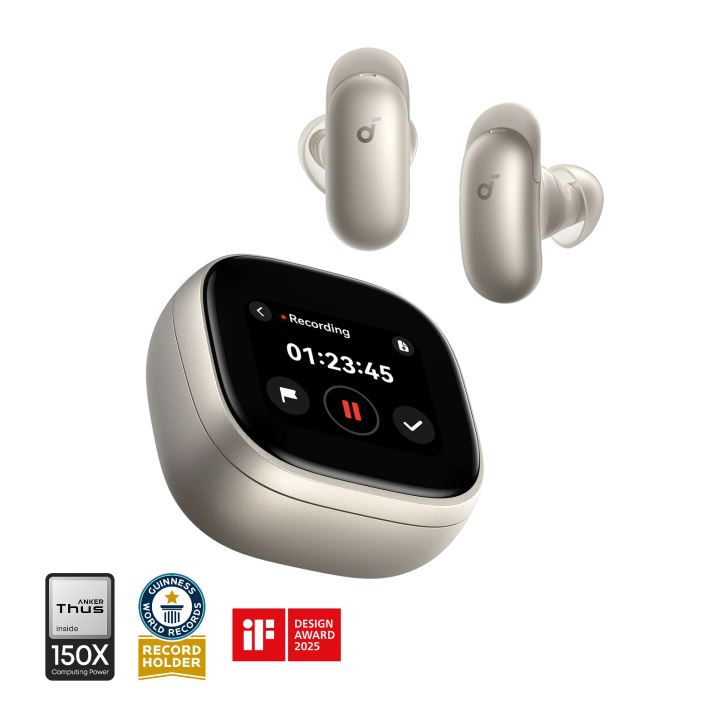
Liberty 5 Pro Max|AI Recording Earbuds with Smart Case
From a reader benefit angle, the appeal is consolidation. You can use the same device family for calls, focus time, commuting, and occasional meeting capture. That is different from buying a dedicated recorder, which may offer a more specialized experience but adds another item to carry and manage.
Recording on the device is free. Transcription and summarization use a subscription model. New buyers get 120 minutes per month free for the first 24 months. That suits lighter weekly use; heavy daily meeting schedules need a closer look at ongoing limits and cost after the included period.
The strongest fit is for people who already want premium true wireless earbuds for calls, commuting, and focus work. In that case, AI meeting capture is a low friction add on. Dedicated recorders such as viaim RecDot may still suit users who want a recording first device. The choice depends on whether you want a specialized recorder or an everyday earbud that can also capture meetings.
This is also why the product should not be judged only by the AI feature. If you rarely record meetings, the everyday earbud experience matters more. If you record every working day, transcription allowance, workflow speed, and file management may matter more than audio extras.
Conclusion
AI meeting tools help when they match how you already work. Desk-based professionals often do well with an AI note taking app. Managers, sales teams, and hybrid workers who move between digital and in person conversations may get more from AI note taker earbuds or smart recording hardware.
Before buying, count a normal week of meetings, note how many are spontaneous, check company recording rules, and decide whether you want a software habit or a hardware shortcut. Start with software if you are unsure. Move to hardware only when you know you need faster capture across more locations. The best tool is the one that shortens the gap between what was said and what you can act on.
FAQs
Are AI meeting tools worth it for small teams?
They can help if your team spends time rewriting notes or tracking decisions after calls. For short, low stakes meetings, a shared document may be enough.
Is it an AI note taking app better than recording earbuds?
Apps suit scheduled online meetings. Recording earbuds or smart cases help when meetings happen in different places and are not always planned.
What should I check before using an AI note taker earbuds at work?
Check company policy, consent rules, storage settings, transcription limits, and whether the device fits your normal call routine.
Can AI meeting tools replace human notes?
Not completely. They can create a useful first draft, but a person should still confirm decisions, deadlines, names, and sensitive details before sharing the notes or treating them as final.