
Beyond Tap to Pay: 7 Ways Small Businesses Are Using Contactless Tech in 2026
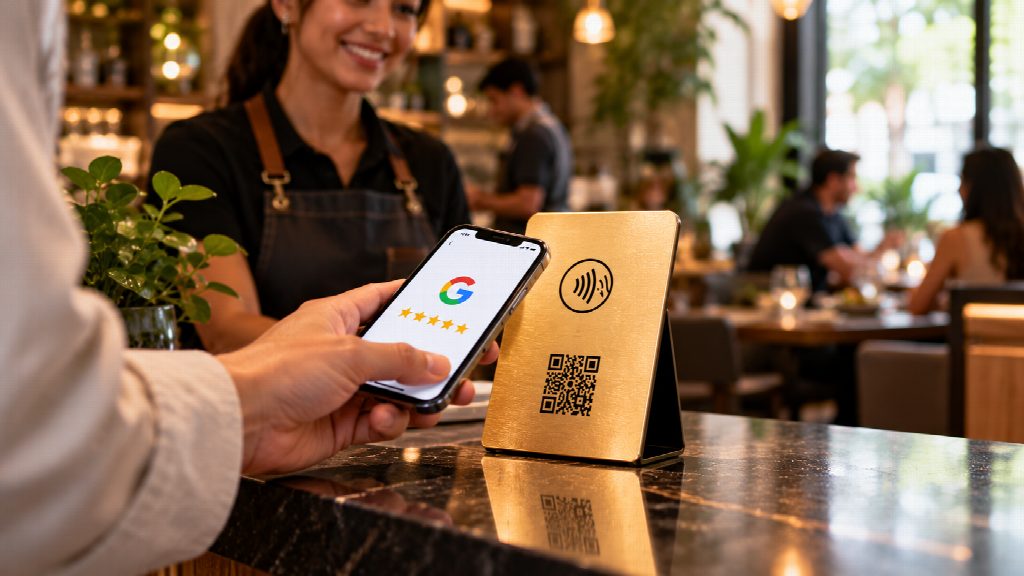
A few years back, when you tapped your phone at a counter, it usually meant you were making a payment. But now, that tiny chip that makes Apple Pay and Google Pay work is showing up in all sorts of places – like menus, business cards, and even those little tags on store shelves. And for small businesses, this chip has become one of the most affordable ways to interact with customers. It’s crazy to think about how something so small can make such a big difference.
NFC, or near-field communication, is the technology that makes a lot of things work. It’s a way for two devices to talk to each other when they’re really close, like a few centimeters apart. Most iPhones and Android phones can read NFC tags without needing any special app. These tags are cheap, don’t need batteries, and can be reprogrammed. So, how are small businesses using NFC? Well, here are seven ways they’re using it for more than just payments.
1. Menus and price lists
Restaurants and cafés first leaned on QR codes for menus. Many now add an NFC tag to the same table card, so a customer can either scan or tap. Tapping is faster in low light and doesn’t depend on the camera focusing. Because the tag points to a web page, the menu can be updated in seconds without reprinting anything.
2. Digital business cards
NFC business cards share a contact page, portfolio or booking link with a single tap. For tradespeople, realtors and consultants who meet clients face to face, it means fewer lost paper cards and an easier way to keep details current. Change your number once and every card you’ve ever handed out is up to date.
3. Guest Wi-Fi without the password hunt
An NFC tag can carry Wi-Fi details, so guests connect by tapping instead of squinting at a password on a chalkboard. Salons, co-working spaces, short-term rentals and waiting rooms use them to cut down on a question staff hear dozens of times a day.
4. Collecting customer reviews
This is one of the fastest-growing uses. A business places a Google review card, plate or stand near the checkout, and a tap opens its Google review page directly. There’s no searching for the business name and no hunting for the right button. Companies such as The Star Company make tap-and-scan review products for this, typically pairing an NFC chip with a QR code so every phone is covered. For a local business, where reviews influence how it shows up on Google Maps, removing a few steps at the moment a customer is happiest makes a real difference.
5. Loyalty and repeat visits
Instead of paper punch cards, some shops use a tap to open a loyalty page or digital stamp card. The customer’s phone does the remembering, and the business gets a cleaner picture of who comes back. It also works well alongside existing point-of-sale loyalty programs.
6. Product information on the shelf
Retailers attach NFC tags to shelf labels or the products themselves to link to specs, how-to videos, care instructions or reorder pages. It’s especially useful for products that need more explanation than fits on a box, such as electronics, beauty products and specialty food.
7. Check-ins and bookings
Clinics, gyms, barbers and repair shops use a tap at the front desk to open a check-in form or booking page. Customers confirm their arrival or book their next visit before they leave, and staff spend less time on the phone. For appointment-based businesses, getting the next booking while the customer is still in the room is often worth more than any marketing campaign.
Getting it right: a few practical tips
Contactless tech is simple, but a few details decide whether customers actually use it:
- Pair NFC with a QR code. Most phones read NFC, but not every customer knows how to tap. A QR code on the same card or stand covers everyone.
- Test on both iPhone and Android. Tap points differ. iPhones read near the top edge, while many Android phones read near the middle of the back. Try both before you print a sign that says “tap here.”
- Place it where people already pause. The checkout counter, the table, the front desk and the waiting area work best. A tag on a back wall rarely gets touched.
- Point tags at a link you control. If the tag leads to a page or redirect you can edit, you can change the destination later without replacing the hardware.
- Tell people what happens when they tap. “Tap for the menu” or “Tap to leave a review” gets far more use than an unlabelled icon.
Why contactless keeps spreading
The thing that ties everything together is that people already have the device they need. There’s no need to download a special app, rent any equipment, or learn anything new – just hold your phone up. For small businesses that are careful with their money, this is a great deal: it’s a technology that doesn’t cost much to set up, is easy to update, and actually makes things easier for the customer.
When you’re just getting started, try to identify one specific moment where your customers are having to wait, search around, or even give up – this could be something like trying to find the menu, connecting to the Wi-Fi, or leaving a review. Just put a tap in that one spot first. Once you see how your customers are using it, you can easily add more taps.