
SPF Flattening: A Practical Guide To Managing Complex SPF Records
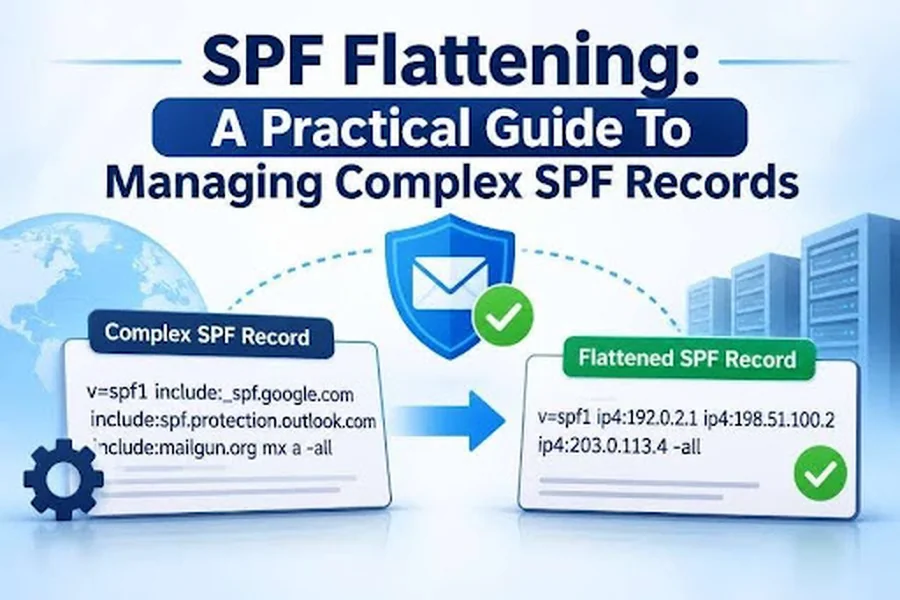
Email authentication helps protect businesses from spoofing, phishing, and unauthorized email activity. A widely used method, Sender Policy Framework (SPF), lets domain owners identify which mail servers are authorized to send email on their behalf. But when organizations use multiple email service providers (ESPs), marketing platforms, cloud applications, and other third-party systems, SPF records can become complex.
A common issue is exceeding SPF’s limit of 10 DNS lookups. If an SPF record requires more lookups than allowed, receiving mail servers may return a PermError, which can affect email deliverability. SPF flattening can help by replacing certain DNS-dependent mechanisms with the corresponding IP addresses.
This guide covers how SPF flattening works, why it matters, its benefits and limitations, and best practices for managing complex SPF records while maintaining email security.
What Is SPF Flattening?
SPF flattening simplifies an SPF record by replacing DNS lookup mechanisms such as `include`, `a`, and `mx` with the IP addresses they resolve to. Because references to external domains can trigger additional DNS queries during SPF evaluation, a record that exceeds the 10-lookup limit can fail SPF authentication. Flattening reduces these DNS dependencies by placing the authorized IP addresses directly in the record.
For example, a traditional SPF record might look like this:
v=spf1 include:_spf.google.com include:spf.protection.outlook.com include:sendgrid.net ~all
A flattened SPF record could look like this:
v=spf1 ip4:192.0.2.10 ip4:192.0.2.20 ip4:198.51.100.15 ~all
The IP addresses shown above are documentation examples, not actual sending addresses. SPF flattening replaces DNS-dependent mechanisms with IP addresses, which can reduce the number of DNS lookups required for authentication.
Why Do Complex SPF Records Become a Problem?
Organizations often rely on several platforms for business communications: Google Workspace for employee email, Microsoft 365 for internal communications, SendGrid for transactional messages, and marketing automation tools for promotional campaigns. Each service may need authorization in the organization’s SPF record. As providers are added, the record can grow longer and more complex, potentially creating several issues.
1. Exceeding the 10 DNS Lookup Limit
RFC 7208 limits SPF evaluations to 10 DNS-querying terms, including mechanisms and modifiers such as include, a, mx, exists, and redirect. Exceeding this limit results in a PermError from the receiving server, which can prevent SPF authentication from passing.
2. Multiple Third-Party Email Providers
Businesses often rely on multiple external platforms to send different types of email, and each provider can add SPF dependencies. These dependencies can be difficult to manage when administrators need to authorize new services or remove outdated ones.
3. Nested SPF Includes
Some email service providers use nested SPF includes that reference additional SPF records, increasing the total number of DNS lookups. As a result, an SPF record with only a few visible includes may still exceed the lookup limit when fully evaluated.
4. Email Deliverability Problems
SPF errors can affect email authentication and disrupt delivery. Depending on their filtering policies, receiving servers may reject unauthenticated messages, quarantine them, or send them to spam.
5. Difficult SPF Record Maintenance
As organizations add or remove email services, they need to update their SPF records regularly. Complex records can make it difficult to spot redundant entries, outdated providers, and unnecessary DNS references. SPF flattening can simplify the record, but it also means keeping the listed IP addresses up to date.

How Does SPF Flattening Work?
SPF flattening identifies DNS-dependent mechanisms, resolves their associated IP addresses, and replaces the original references with explicit IP authorization mechanisms.
Here is how the process generally works.
Step 1: Identify the Existing SPF Record
Start by locating the SPF TXT record published in your domain’s DNS settings.
For example:
v=spf1 include:_spf.google.com include:spf.protection.outlook.com include:sendgrid.net ~all
Review every mechanism and modifier to understand which services are authorized to send emails using your domain.
Step 2: Identify DNS Lookup Dependencies
Examine the SPF record to identify mechanisms that trigger DNS queries.
Common DNS-querying mechanisms include:
- include: References another domain’s SPF policy.
- a: Retrieves IP addresses associated with a domain’s A or AAAA records.
- mx: Retrieves the mail server addresses associated with a domain.
- exists: Performs a DNS query to check whether a specified domain exists.
- redirect: References another SPF record for policy evaluation.
Nested includes must also be examined because they can increase the total lookup count.
Step 3: Resolve the Referenced Domains
Use DNS lookup tools to retrieve the IP addresses associated with the referenced SPF domains.
For example, an include mechanism may resolve into multiple IPv4 and IPv6 addresses. These addresses represent the sending infrastructure authorized by that provider.
Make sure you retrieve all relevant addresses and understand whether the provider uses dynamic IP ranges.
Step 4: Replace DNS Mechanisms With IP Addresses
After collecting the required IP addresses, replace the relevant mechanisms with ip4 or ip6 entries.
For example:
Original SPF record:
v=spf1 include:mail.example.com ~all
Flattened SPF record:
v=spf1 ip4:192.0.2.25 ip4:192.0.2.30 ip6:2001:db8::25 ~all
This reduces the need to perform DNS lookups for the replaced include mechanism.
Step 5: Publish the Updated SPF Record
After preparing the flattened record, publish it in your domain’s DNS configuration. Update the existing SPF TXT record rather than creating a second one for the same hostname; each domain should have only one SPF policy record.
Step 6: Test the Updated Configuration
After publishing the updated record, confirm that it includes the correct IP addresses and stays within the SPF lookup limit. Use an SPF checker or DNS lookup tool to check for syntax errors, missing mechanisms, and potential authentication issues. Then send test emails through your authorized email platforms and review their authentication results.
Key Benefits of SPF Flattening
SPF flattening provides several advantages for organizations managing multiple email services.
Reduces DNS Lookup Requirements
SPF flattening replaces DNS-dependent mechanisms with explicit IP addresses, which can reduce DNS lookups and help organizations stay within SPF’s 10-lookup limit.
Simplifies Complex SPF Records
Flattening can simplify SPF evaluation by reducing nested include dependencies, letting administrators review authorized IP addresses directly instead of tracing multiple external SPF references.
Supports Multiple Email Service Providers
Organizations that use multiple email service providers can use flattening to manage the DNS lookup requirements of their sending platforms.
Helps Prevent SPF PermError
If an SPF record exceeds the permitted DNS lookup limit, evaluation can return a PermError. Properly implemented flattening can help prevent this by reducing DNS-dependent terms.
Improves SPF Management Visibility
Flattened records make it easier to see which IP addresses are authorized to send email for a domain, helping administrators review and audit sending infrastructure. But flattening alone doesn’t guarantee better deliverability. SPF alignment, DMARC configuration, sender reputation, and other authentication factors also affect whether messages are accepted.

Limitations and Risks of SPF Flattening
Although SPF flattening can solve DNS lookup problems, it is not a universal solution. Organizations should understand its limitations before implementing it.
- Requires Regular IP Address Updates: Keeping IP addresses accurate is a key challenge. Email service providers may change their sending infrastructure, add IP ranges, or remove addresses. If the flattened SPF record isn’t updated, legitimate emails may fail SPF authentication.
- Can Increase SPF Record Length: Replacing SPF includes with individual IP addresses can significantly lengthen a record. Because DNS TXT records have size limits, oversized SPF records can be harder to manage and may exceed practical DNS response limits.
- Does Not Eliminate Every DNS Lookup: SPF flattening only reduces lookups associated with the mechanisms it replaces. Other DNS-dependent mechanisms, such as a, mx, or exists, may still trigger lookups if they remain in the record.
- May Create Maintenance Challenges: Manually collecting and updating IP addresses can take time, particularly when an organization uses multiple third-party email platforms. Without a reliable update process, flattened records may become outdated and lead to authentication failures.
- Can Affect Provider Compatibility: Some providers recommend that organizations reference their published SPF records instead of maintaining manually copied IP ranges. Before changing an SPF configuration, administrators should review the provider’s documentation. For more details, kindly visit the Autospf website.