
Best DMARC Generator Tools In 2026: Simplify Email Authentication And Security
What a DMARC Generator Is and Why It Matters in 2026
As of 2026, the Domain-based Message Authentication, Reporting, and Conformance (DMARC) standard remains fundamental to contemporary email authentication. A DMARC generator is an advanced tool that streamlines the process of creating DMARC records, which are vital for confirming the legitimacy of emails originating from your domain. As more organizations acknowledge the necessity of a secure email framework, the importance of these generators has surged.
DMARC operates in conjunction with the Sender Policy Framework (SPF) and DomainKeys Identified Mail (DKIM), providing a strong defense against issues like domain spoofing, phishing attacks, and business email compromise. By setting a DMARC policy via a DNS TXT record located at the `_dmarc` subdomain, companies guide receiving mail servers on how to address messages that do not pass authentication.
In 2026, the threat landscape has morphed into one filled with increasingly clever social engineering tactics. Automated DMARC generators not only make the intricate process of generating DMARC record syntax easier but also assist organizations in adeptly handling policy updates, aligning domains, and managing subdomain policies. Their broad implementation has become essential for businesses striving to ensure compliance with regulations and safeguard their email communications from abuse.
Key Features to Look for in the Best DMARC Generator Tools
When selecting a DMARC generator in 2026, it’s essential to thoroughly assess its features and how well it meets your email authentication requirements. The ideal DMARC record generator will provide a wide range of tools for handling both fundamental and sophisticated DMARC setups, allowing you to maintain accurate control over your DMARC records and policy tags.
Comprehensive Record Creation & Syntax Validation
An effective DMARC generator should streamline the creation of DMARC records through an intuitive interface that allows users to easily choose policy tags like `p=none`, `p=quarantine`, and `p=reject`. It’s crucial to include automatic validation for proper DMARC syntax and its compliance with DNS TXT and CNAME record standards to avoid any misconfigurations that might interfere with email operations.
Optional Tags and Advanced Policy Management
The inclusion of optional tags like reporting mechanisms (`rua`, `ruf`), alignment settings (`adkim`, `aspf`), subdomain policies (`sp`), and percentage sampling (`pct`) is essential for organizations seeking detailed management of their DMARC responses. Customizing both aggregate and forensic reports enables businesses to obtain meaningful failure insights and XML reports designed to meet their specific requirements.
Integrated DNS Publishing and Record Updates
High-quality DMARC record generators typically connect seamlessly with DNS management services like GoDaddy and Cloudflare, simplifying the process of publishing records. These generators can create DMARC records manually for users managing their own DNS zones or facilitate automated updates via DNS APIs. Ensuring accuracy in the DNS TXT record is essential to reduce the likelihood of errors.
Built-in Reporting and Monitoring Capabilities
The top DMARC generator tools connect with DMARC Report APIs or include internal dashboards, converting basic aggregate and forensic reports into useful insights. Capabilities like customizable reporting schedules, management of report recipients, and automated notifications facilitate continuous oversight and swift action in response to any issues identified by your DMARC policy.
Top DMARC Generator Tools for Creating Accurate DNS Records
EasyDMARC
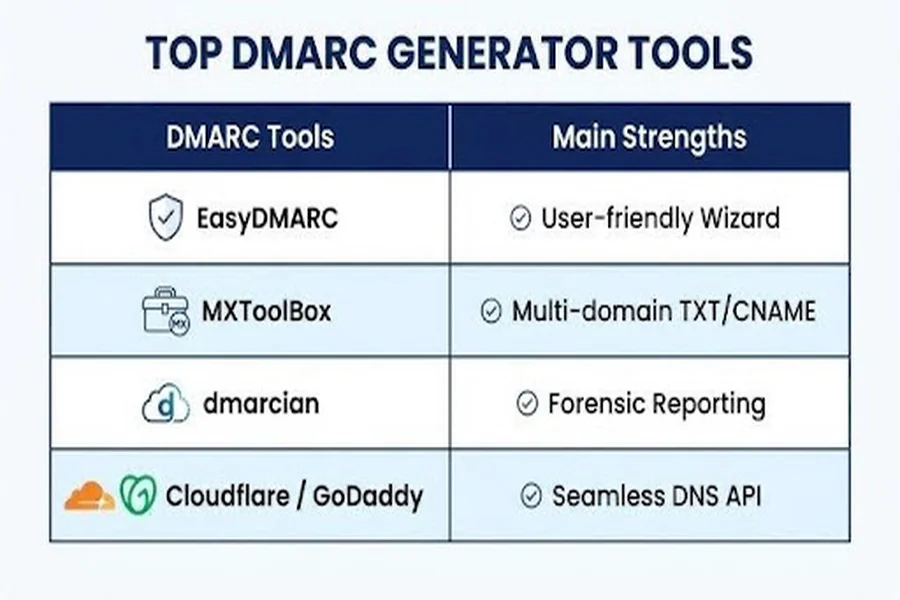
EasyDMARC continues to lead the way in DMARC generation, recognized for its user-friendly interface that simplifies the creation of DMARC records. It offers features like a real-time record verification tool and assistance in choosing policy tags. Additionally, EasyDMARC provides organizations with wizards that guide them through the process of generating DMARC records, ensuring the proper configuration of the `_dmarc` DNS TXT record. Notably, their DMARC Record Wizard is appreciated for its ability to adjust record syntax in line with changing industry standards.
MXToolBox
MXToolBox is well-known for its dependable tools for generating DMARC and SPF records, as well as its extensive DNS functionalities. The SuperTool collection enables users to generate, verify, and deploy DMARC records, and the DMARC Record Checker guarantees correct setup. MXToolBox accommodates both TXT and CNAME record formats, offering versatility for intricate or multi-domain setups.
dmarcian
The DMARC generator from dmarcian is favored by businesses needing extensive customization and in-depth reporting. This platform offers fine-tuned controls for DMARC policies, options for aligning domains, and management of subdomain policies. dmarcian is particularly effective at presenting both aggregate and forensic reports, enabling organizations to track authentication processes and adjust their DMARC records as needed.
GoDaddy & Cloudflare DNS Management
GoDaddy and Cloudflare simplify DMARC record management through seamless DNS integration, allowing administrators to create and implement records using intuitive interfaces or API calls. Tools like DMARCReport further help monitor DMARC configurations, verify record syntax, and support accurate implementation across the email system.
Additional Solutions
Additional significant resources feature Delivery Center, DMARC Report, and public testing utilities highlighted on YouTube. These tools offer automation, XML report parsing, and analytics on domain performance, thanks to their integrations with platforms such as Google Analytics, CookieYes, and Crisp.
How to Use a DMARC Generator to Build and Publish Your Policy
Step 1: Input Domain and Select Policy
Start by inputting your domain into the DMARC record creation tool. Choose your preferred DMARC policy (`p=none`, `p=quarantine`, or `p=reject`), which outlines the approach mail servers should take in response to authentication failures. This policy tag will be essential to your DMARC record and will define your enforcement level.
Choosing the Right Policy
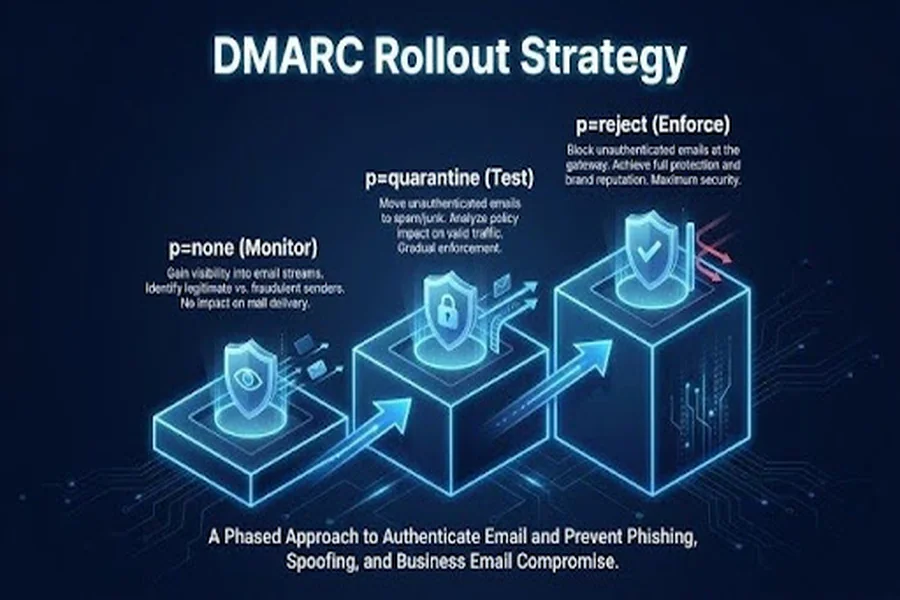
- Monitor Only: Using `p=none` enables the gathering of summary and failure reports while leaving email delivery unaffected.
- Quarantine Policy: With `p=quarantine`, potentially harmful emails are directed to quarantine folders. This approach reduces risk without completely blocking the messages.
- Reject Policy: The `p=reject` setting ensures that any emails not adhering to the standards do not reach users, providing the highest level of defense against phishing and domain spoofing.
Step 2: Configure Reporting and Alignment Options
Choose the recipients for your aggregate report (`rua`) and forensic report (`ruf`), indicating the domains where the XML reports will be sent. Configuring the alignment modes (`adkim`, `aspf`) allows you to enforce either strict or relaxed alignment for SPF and DKIM authentication validations.
Additional Tag Configuration
- Percentage Sampling (`pct`): Specify the proportion of email communications that must undergo DMARC validation.
- Subdomain Policy (`sp`): Establish separate policies for subdomains when your email distribution is divided.
Step 3: Generate and Validate the Record
Press the button to create the DMARC record. This tool will generate a string that complies with the `v=DMARC1` format based on your choices and will create a DNS TXT record for your `_dmarc` subdomain. Make sure to use the DMARC checker to verify the record’s accuracy before you publish it.
Step 4: Publish in Your DNS Zone
Access your DNS provider (such as Cloudflare or GoDaddy) and locate the DNS zone for your main domain. Create a new TXT record at `_dmarc.yourdomain.com`, entering the value you generated. Additionally, some providers might allow you to publish DMARC records using CNAME records in managed settings.
Best Practices for Monitoring, Testing, and Strengthening DMARC Security
Ongoing Monitoring and Report Analysis
After creating and implementing your DMARC record, it’s important to maintain ongoing oversight. Utilize aggregate reports (rua) to assess authentication results, spot possible vulnerabilities, and uncover any unauthorized sending entities. Forensic reports (ruf) offer detailed insights into specific authentication failures and are vital for examining attempts at phishing or business email compromise.
Regular Policy and Record Updates
As your email system develops, make sure to adjust your DMARC policy accordingly. Utilize a DMARC record generator for regular assessments and modifications of policy tags and optional settings like reporting frequency or alignment specifics. When implementing policy adjustments, do so incrementally, beginning with `p=none` and gradually advancing to `p=reject` as your trust in your domain’s compliance increases.
Combine with SPF and DKIM Record Management
Successful DMARC implementation depends on strong SPF and DKIM setups. Utilize resources such as the SPF Record Generator to ensure that all relevant records are current, maintaining harmony between the Header From domain, DKIM selectors, and any associated subdomains. Regularly employ record checker tools to confirm correct syntax and identify any configuration changes.
Utilize Record Checker and Reporting Tools
Enhance your DMARC generator by integrating tools like the DMARC Record Checker, SuperTool, and Delivery Center. These tools allow you to verify DMARC record implementation, get notifications about potential problems, and access in-depth analytics through user-friendly dashboards similar to Google Analytics or in XML format. This multi-faceted strategy for monitoring domains and publishing records helps maintain a flexible and adaptive email security stance.
Educate and Train Staff
In conclusion, it is essential to continuously educate IT and security personnel on best practices for policy tagging, understanding aggregate and forensic analyses, and effective response strategies. This ongoing training is vital for robust phishing defense and for reducing the risks linked to domain spoofing and business email compromise.
By utilizing sophisticated DMARC generator tools, automating the management of DMARC records, and following stringent monitoring processes, organizations can enhance their email authentication, protect their communications, and defend their brand against the more intricate threats expected in 2026.