
How to Assess AI Generators and Models for Advanced Anime Art Workflows
Anime AI generators offer plenty of models to experiment with, and browsing their galleries can give you a good idea of the styles they produce. But when you’re choosing a generator for your own artwork, there are other things worth examining.
How accurately does each model follow your prompts? Can it reproduce your original characters across different scenes? And how much control do you have over the final image?
These questions become particularly important when you’re developing a recurring character or experimenting with a distinctive visual style.
In this guide, we’ll explore how to compare anime AI generators and their models, from image quality and prompt accuracy to character consistency and editing capabilities. I’ll use PixAI to demonstrate the tests and help you identify the features that matter for your creative projects.
What makes an anime AI generator different?
Anime-focused AI generators are designed with the visual styles and creative requirements of anime art in mind. Alongside standard text-to-image generation, they often offer specialized anime models, character LoRAs, and reference tools that give you more control over the artwork you create.
Model variety is one of the main differences. You might want clean linework and cel shading for a manga-inspired illustration, softer colors for a romantic scene, or a more detailed style for fantasy character art. Having several anime models to choose from gives you room to explore these directions without changing platforms.
Character customization is another important consideration. Community LoRAs can help you achieve particular styles or character designs, while custom LoRA training and reference images offer ways to develop your own original characters across multiple illustrations.
PixAI brings these options together with image editing and other creative features. But the number of available models and tools is only part of the picture. You’ll also want to test how well they handle your prompts, preserve character details, and produce the visual style you’re looking for.
Start with the actual anime image quality
Image quality is still a strong starting point. If the generator struggles to produce an appealing character or a convincing composition in the first place, the other features will only take you so far.
However, a quick look at a thumbnail doesn’t tell you very much.
Look closely at the face and eyes. Check the hands and proportions. Pay attention to the hair, clothing, accessories, and background. Then look at the image as a whole and consider whether the composition works.
A good test prompt should contain enough specific information to give you several things to evaluate. For example, the one used here gives you several details to check once the image is generated.
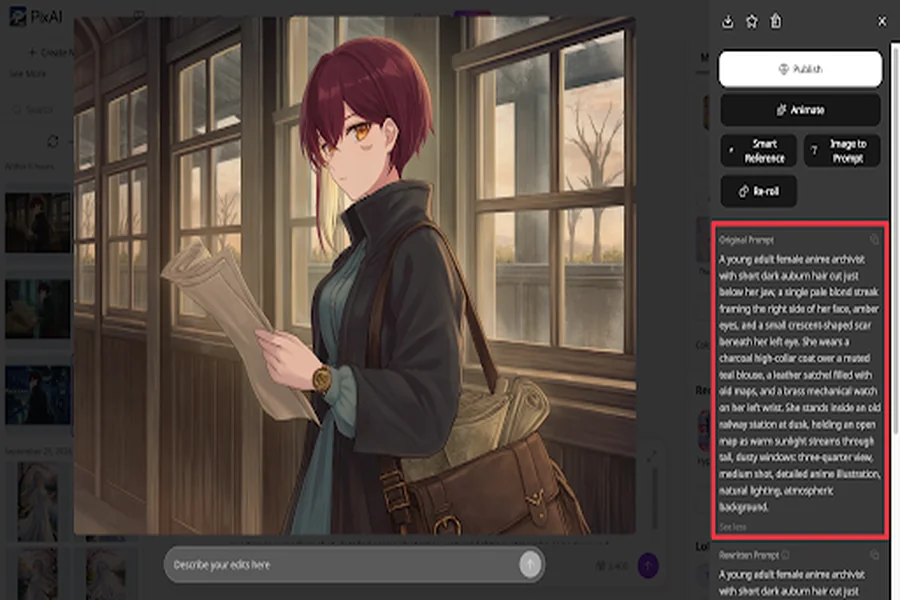
Now check: Did the character get the auburn hair and blond streak right? Are the amber eyes visible? Did the model include the scar? Does the outfit match the description? Is the brass watch present? Does the station look like the setting described in the prompt?
You can use PixAI for this type of test by running the same prompt through its available anime models. The goal is to understand the kind of results you can expect from the models you’re considering.
A good first generation gives you a reason to keep testing. The next step is finding out how the generator handles more demanding instructions.
See what happens when your prompt gets specific
Prompt following becomes easier to judge when you give the generator several details you can check afterward.
Describe where the character is standing. Specify the camera angle, outfit, pose, expression, and a few elements in the surrounding environment. Then look at the finished image to see which instructions were followed and which were changed.
The archivist character gives you a useful example because her appearance contains several details that should remain identifiable. Let’s reuse the character with PixAI’s Smart Reference and give the generator several things to handle at once.
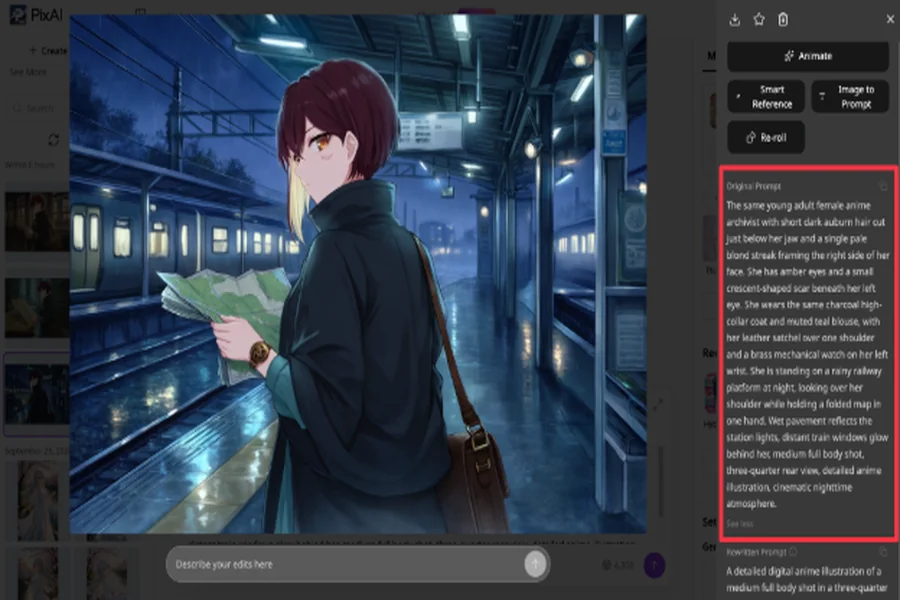
Here, check whether the character retains her appearance while the setting, lighting, camera position, and pose all change.
Did the blond streak remain? Is the hairstyle still recognizable? Does she still look like the same character?
That matters because there is a big difference between asking for a general anime illustration and trying to create a specific scene. As requirements get more precise, you need to know how reliably the model can follow them.
PixAI lets you compare different available models with the same prompt. This can be especially useful when you’re testing more involved scenes that combine character details, composition, and environmental information.
Your prompts don’t need to be very complicated for this test. A few clear requirements can reveal a lot about how a model handles instructions.
Try making the same character twice
Character consistency deserves its own test if you’re planning to create an original character.
Start with a basic design. Give the character a name, appearance, hairstyle, outfit, and a few features that make them easy to recognize. Generate an image until you’re satisfied with the basic version.
Then change the situation.
Move the character somewhere else. Give them a different pose or expression. Change the camera angle. You could even put them in another outfit.
Now compare the new image with the original.
Does the face still look like the same character? Does the hairstyle remain recognizable? Are the distinctive accessories still there?
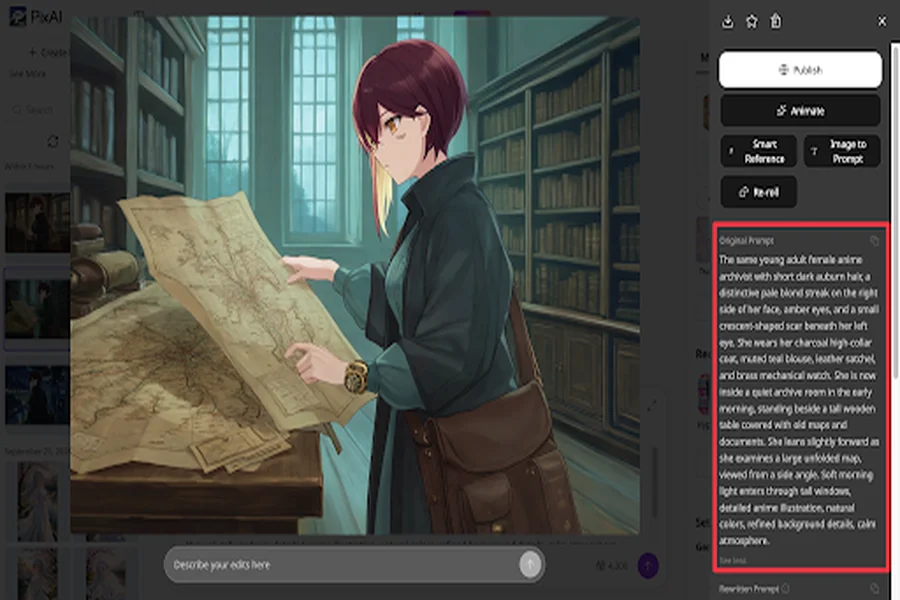
This test can tell you much more than another look at the generator’s sample gallery.
For an OC, the second or third generation can reveal problems that aren’t obvious in the first image. If you have to keep rewriting your prompt just to get the original character back, creating a larger series becomes much more difficult.
PixAI offers reference-based generation and other character-control options that can help when a text description isn’t enough to reproduce a design. These features are worth testing with the same character you used in your first generation.
The key point is knowing how much control you have when the character begins to change between generations.
Find out whether references and LoRAs actually help
Once you’ve tried recreating a character with text alone, you can see whether additional controls make a difference.
The terminology around these tools can sound complicated at first, but the basic roles are fairly easy to understand.
A model provides the broader visual foundation for an image. A LoRA can give you more targeted control over something such as a character or visual style. A reference image gives the generator visual information to work from.
The important question is how useful these options are for the work you actually want to do.
Suppose you’ve already created an OC with a particular hairstyle, outfit, and accessory. Describing all of those details again for every new image takes time, and the results may still vary.
A reference- or LoRA-based workflow gives you another way to carry some of that information into a new generation.
PixAI is useful here because its workflow includes models, LoRAs, and reference-based generation. Instead of simply checking whether these features are available, use the character from your previous tests and see what happens when you introduce additional control.
If the character becomes easier to reproduce, you’ve learned something useful about the workflow.
That kind of hands-on test tells you much more than seeing a feature mentioned on a platform’s homepage.
Don’t stop testing when you get a good image
Another useful test begins with an image you already like.
Find something that needs changing.
Maybe the character looks right, but the background doesn’t fit the scene. Perhaps you like the outfit but want to change one detail. The lighting might be too dark, or you may want to give the character a different expression.
Now see how easily you can make that change.
Generating another image is always an option. The problem is that you may lose other parts of the image that were already working. If you spent time getting the character, lighting, composition, and atmosphere right, starting again can mean re-solving several problems you had already addressed.
This makes editing and iteration important parts of the evaluation.
For example, let’s try to get our original character to face the camera more and smile without changing anything else.
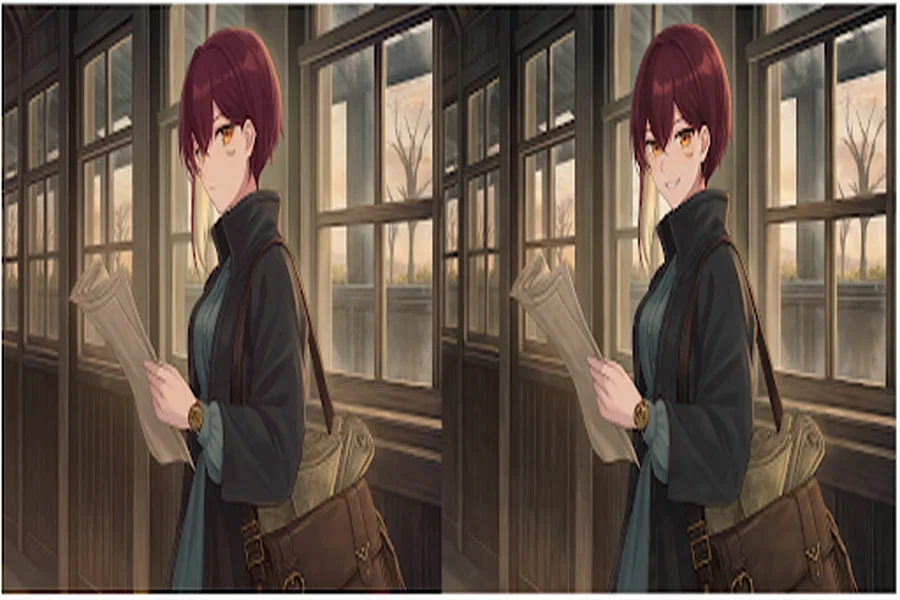
This kind of test is useful because it gives you a clear before-and-after comparison.
Take one successful generation and make a specific change. Then compare the new version with the original. Pay attention to what stayed intact and what changed unexpectedly.
PixAI supports this workflow because you can use the Reference Pro model or Smart Reference to build on an existing result instead of treating every adjustment as a completely separate generation.
This is also where the practical side of an AI generator becomes easier to judge. The first generation may be quick, but a real project can involve many rounds of changes afterward. The editing process can therefore strongly affect how useful the platform feels over time.
Which type of anime AI generator fits your workflow?
Different creators can have very different requirements.
Someone who occasionally wants to create an anime wallpaper may care mostly about image quality, simple prompting, and how much they can do for free.
An OC creator will probably spend more time thinking about character consistency, references, LoRAs, and editing. Someone creating a manga or webcomic will need to think about recurring characters, composition, and the ability to make changes across multiple images.
Social content creators may care more about generation speed, reusable characters, and straightforward editing. More advanced users may want a wider range of models and greater control over references and LoRAs.
This is why a general list of the best anime AI generators can only tell you part of the story.
Your requirements depend on what you plan to make.
Where PixAI fits
After these tests, PixAI feels more like a broader anime creation environment than a place to enter a prompt and generate an image.
You can explore different anime models while working out a project’s visual direction. When you need more control over a character or style, you can work with LoRAs or references. You can also continue editing existing generations instead of starting each idea from a blank prompt.
That combination can be useful when a project develops over time.
You might begin with a basic character generation, experiment with different models, introduce a reference or LoRA when you need more control, and then continue refining the images that are already working.
So, how should you choose an anime AI generator?
The right generator depends on the kind of artwork you want to create and how much control you need over the results. Image quality matters, but so do the available models, customization options, and the ability to refine your artwork as your project develops.
You can explore PixAI to compare anime models and experiment with references, LoRAs, and editing tools. Pay attention to the features that make a noticeable difference to your own artwork. You’ll have a much clearer idea of which generator and model suits your creative needs.